Update Your Contact Information
Summary
How students can update their home address, email address, and phone number
Address, Email, and Phone Updates
Below are instructions for updating your street/mailing address in your Self-Service account.
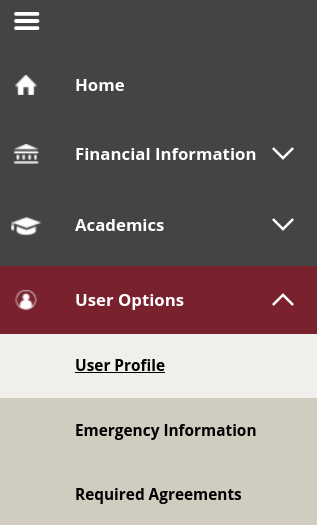
- Log in to Self-Service. Select the menu icon at the top left, select "User Options" from the left navigation bar, and select "User Profile".
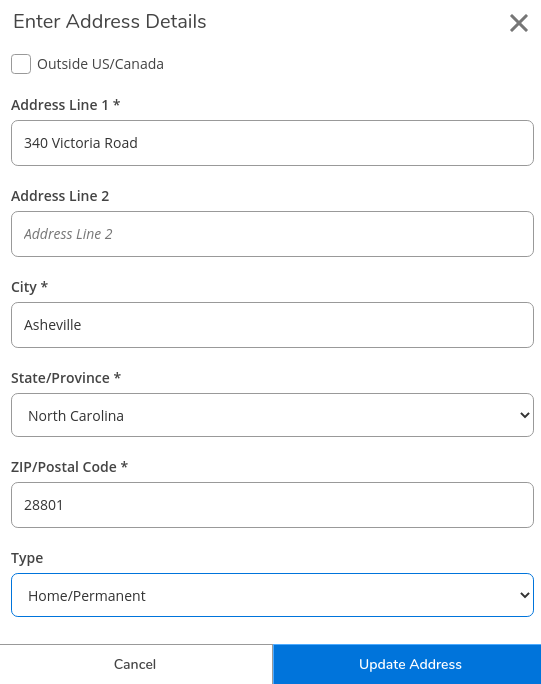
- Update your address by selecting the pencil icon to the right of your address under the "Edit or Remove" column.

- After updating your information, be sure to click "Update Address" at the bottom to save any changes.
- Follow the same steps to update your email address or phone number.
Name Changes
Visit abtech.edu/records for additional information about how to submit a Change of Vital Data Form if you have had a legal name change or submit a Preferred First Name Request Form.
Key Words: name, address, change, Change of Vital Data form, contact information, update