Payment Plans
Summary
Overview of payment plans and adjustments to your plan
How to Set Up a Payment Plan
Payment plans can only be set up online, using the steps below:
- Go to abtech.edu, select "Online Services" in the upper-right corner, and select "Self-Service."
- If you are already logged in to your student email, you will already be logged in to Self-Service through Single Sign-On (SSO). If you are not logged in to your A-B Tech Microsoft Account, you will be prompted to log in through Microsoft.
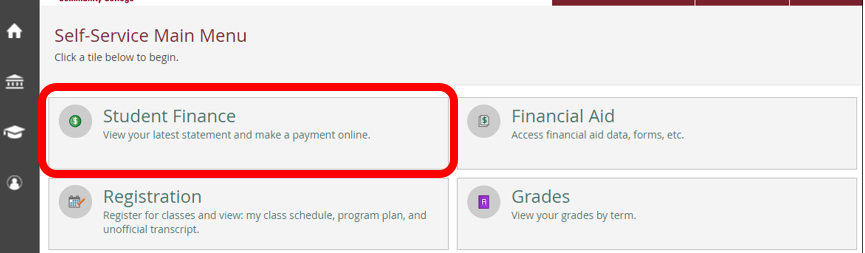
- Click on the "Student Finance" tile on the Self-Service Main Menu.
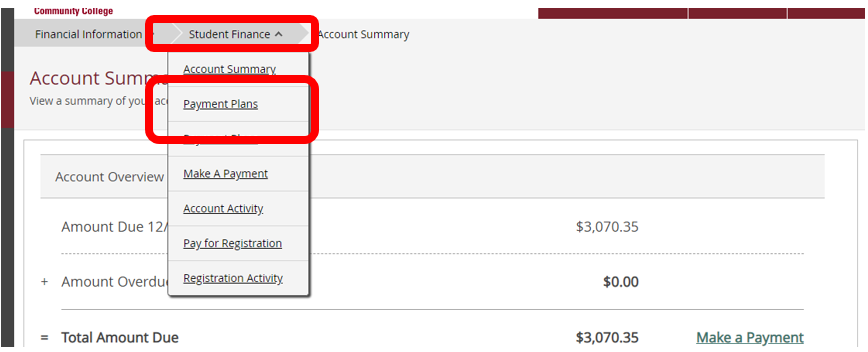
- Hover over the "Student Finance" drop-down menu at the top and select "Payment Plans."
- Click on the "Proceed to Processor" button.
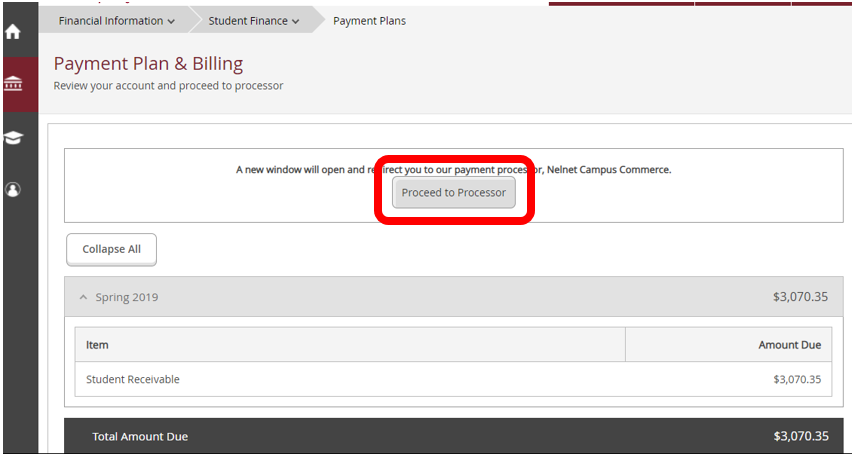
- A new tab or window will open. Follow the prompts and fill in your contact and payment information to finish setting up your payment plan.
Payments Overview
All payments will be automatically withdrawn from your checking account, savings account, or credit card (Discover, American Express, MasterCard, or Visa). If you don't have a bank account or credit card, you can purchase a reloadable debit card for the payment withdrawals.
Payment plans generally consist of three separate payments. The first payment is for one-third of your balance and is due at the time the payment plan is set up, along with the $30 enrollment fee. The second two payments will occur automatically.
If you set up a payment plan later in the semester, you may have only two total payments, and the payments will be more than one-third of your balance.
Payment Plan Dates
The deadline to pay for your classes is available at Payment Deadlines and at Registration Dates and Deadlines.
The number of installments you will have will depend on the date you set up your payment plan. You can find these designated payment plan dates listed at mycollegepaymentplan.com/asheville-buncombe-tech-community-college.
Scroll down to the "Target Dates to Enroll By" section to find the date by which you are setting up your payment plan.
Future installments will occur automatically on the 5th of each month.
Partial Payments/Pay in Full
You can make partial payments to your payment plan or pay the plan in full, but you must do this at least five calendar days prior to a scheduled payment date. A partial payment will be evenly divided between the remaining scheduled payments.
Partial payments that are smaller than the one-third of your charges cannot be made through Self-Service; they must be made in person in the Cashier's Office.
You can completely pay off your payment plan through Self-Service. For instructions, please see the link below.
Adding/Dropping a Class
If you add or drop a class after setting up a payment plan, your payment plan will be adjusted automatically. If you set up a payment plan, drop your classes, and are due a refund, your refund will go to the refund preference you set up with BankMobile.
If you do not drop a class yourself in Self-Service but are dropped for non-attendance, you will not be eligible for a tuition refund.
Payment Plans and Financial Aid
If you set up a payment plan online, and afterwards financial aid is awarded, your financial aid will automatically pay towards your payment plan. If the financial aid is enough to cover the entire balance, the payment plan will be canceled. If your financial aid disbursement is greater than your payment plan, any remaining funds will be refunded to you through the refund preference you set up with BankMobile. Financial Aid refunds are processed on specific dates throughout the semester, depending on the class start date and the type of aid.
If you set up an "in-house" payment plan (done in person at the Business Office) and are then awarded financial aid, we will need to manually adjust or cancel your payment plan. Please contact the Business Office directly at businessoffice@abtech.edu or (828) 398-7152 for assistance.
Failed Payments
If you set up a payment plan but don't have the funds available in your account at the time of a scheduled payment, a payment withdrawal will be tried again on the 20th of the month. There will be a $30 fee from Nelnet and a $50 fee from A-B Tech if a payment is returned.
Additional Questions
For any additional questions about payment plans, contact the Business Office directly at (828) 398-7152 or businessoffice@abtech.edu.
If you need to make an adjustment to an established payment plan account, you'll need to call the company directly at (800) 609-8056 and provide your student ID number.